
Set Up Accreditation Primary Rules

Accreditations are built as a list of Primary Rules, which are simply a grouping of one or more Generic Rules. Just like their generic counterparts, Primary Rules can be structured for reuse in any number of certifications or curriculums. 

Feature Overview and Requirements

Accreditations are built as a list of Primary Rules, which are simply a grouping of one or more Generic Rules. Just like their generic counterparts, Primary Rules can be structured for reuse in any number of certifications or curriculums.

Create primary rules that evaluate compliance as either a “One of” or “All of” requirement; so that learners must complete either “one of” the generic rules in list or “all of” them to meet the primary training objective.

Generic rules are the building blocks of Primary Rules, and both become the building blocks for Certifications and Curricula.
Step by Step Procedure and Field Description

Add a Primary Rule

  1. From the Administration page, select Accreditations > Primary Rules.
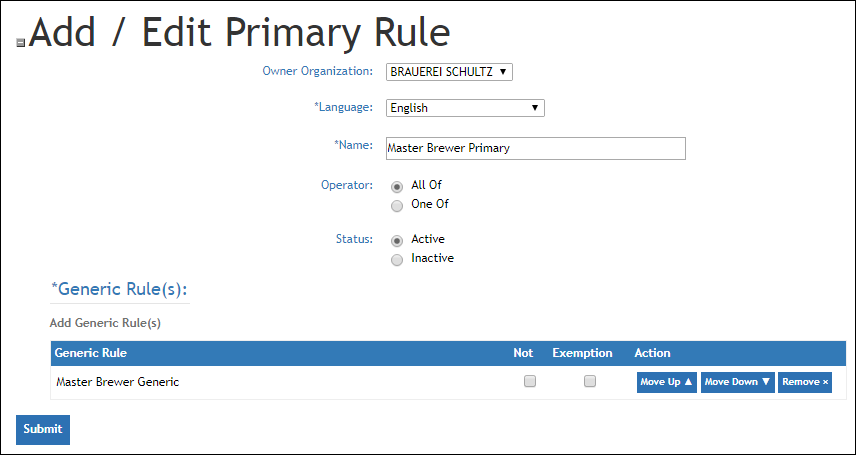
  2. Click +Primary Rule. On the “Add/Edit Primary Rule” page, enter information in each field as described below. Fields designated with an asterisk are required. 
    a. Owner Organization: Display only. 
    b. Language: Provide translations for the Rule Name. Default “English” is required.
    c. Name: Provide a descriptive name or title for the rule.
    d. Operator: Decide if this rule should evaluate All Of its generic rule components as required, or if users can earn credit by completing just One Of the generic rules in list.
    e. Status: Choose whether the rule is Active or Inactive for evaluation.
  3. Click Add Generic Rules to open a picker from which you can select the list of generic rule components. 
  4. Once you have added generic rules, use the Move Up, Move Down, Remove buttons to manage list items and display order. 
  5. Click Submit.

The checkboxes Not and Exempt are not often used, but are available for more advanced accreditation setups, primarily to manage complex scenarios around requirement visibility and inclusions or exclusions.  

For instance, if you have a certification for every brand and are trying to figure out later if the user had completed all of the requirements, you can create a single certification with all brands in it displaying only the brands that a user had. The user would see only courses they needed to take in the Certification.

This is accomplished through the use of “Not” and “Exempt” on a Primary Rule. 

  • NOT is the absence of something. In this case, the rule is saying “check the user’s performance measure for Acme Brand” (e.g. Does their dealer have the Acme Brand?)  If the measure does not exist (“No, they do not have the Acme Brand) then that satisfies the NOT rule. (No need to show them Acme requirements because they aren’t relevant to the user)
  • EXEMPT means that if the rule is satisfied, then the user is exempt from this Primary rule all together. (If the person’s location doesn’t sell/service Acme, the Acme Requirements are simply satisfied by the NOT.