LMS Release Notes – 3.0.0.98859

LatitudeLearningRelease NotesLMS Release Notes – 3.0.0.98859

Latitudelearning® announces a new release of the LatitudeLearning® LMS. Version 3.0.0.98859 was promoted to production on Sunday morning, November 23, 2025.

ENHANCEMENTS

Administrator Menu Favorites:

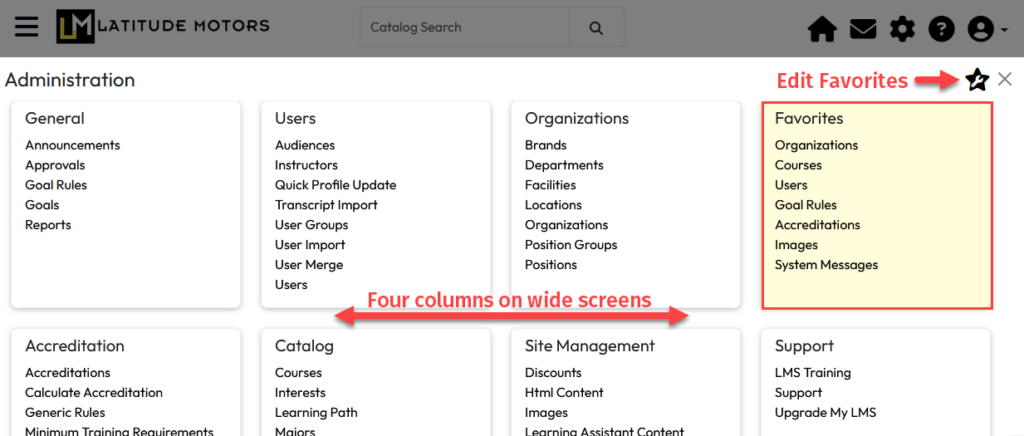
To augment the new Administration page, we restored the ability to set up Favorite tools. If you had Favorites established in the Classic Administration home, they were converted to Favorites on the new page. The image shows the new means of accessing the Edit Favorites configuration page, which is designed similarly to the original. One improvement to Edit Favorites is the new ability to determine how you want to open the administration page – by hovering over the header gear icon or by clicking it. 
Learn more about using this new feature on our Support Site:  Using Edit Favorites.

Edit Images Page Updates: Made the following updates to improve the display and management of images –

  • The display of LMS and Catalog images was improved to include a Delete icon within the image card to clarify the purpose of the checkbox. Clicking the icon or enabling the checkbox will select the image for deletion. Actual deletion takes place using the Delete button (at the bottom of the page) as before.
  • On the LMS Images tab, we added a link to each image card that captures the relative URL of that image for use in other areas of the LMS, such as HTML pages and blocks. Click the image link or the image itself to capture the URL.
  • On the Catalog Images tab, the following updates were made:
    • Improved performance for portals with extensive lists of images.
    • Added a small yellow indicator on the lower right corner of the image cards when a default image has been selected but not saved.
    • Added a Reset button which can reset images back to the standard system default images or icons or reset the images back to the last saved version 
  • Added functionality to reset back to default images or icons.
  • Portal image display was improved, and clicking on the image/link icon will copy the relative URL to the clipboard now.

Learn more about working with images on our Support Site: Manage Images in the LMS

RESOLVED ISSUES

User Search and Audience: Fixed a bug preventing multiple position groups from being selected within a single criteria box. Additionally, we improved error handling and styling on the “no users found” message.