A few years ago, we introduced a modern, responsive user interface (UI) for LatitudeLearning. Since then, we’ve continued to refine it with customer feedback and new technology. Many organizations switched over right away, but we’ve also continued supporting those who preferred the classic UI.
Now, with technology evolving quickly and today’s learners expecting flexible, mobile-friendly tools, we’re on target to officially retire the classic home page and UI on January 18. After this update, classic UI pages will no longer be accessible and all portals which have not converted will be automatically converted by Latitude with the My Learning Page set as the default Home and Login Landing pages.
We’ve reached out to our subscription customers with guidance, especially for those with complex customizations and interfaces. For all customers, we’ve created a transition support page with resources to help you navigate the switch and manage any internal changes needed to make the move smoother for your learners.
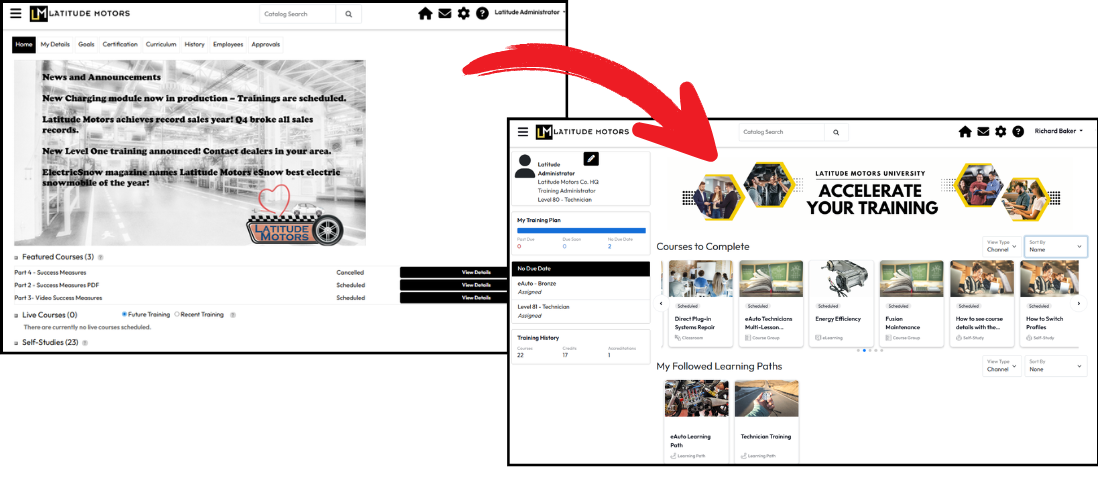
If you are a portal subject to this transition, we feel that you and your users will find the change beneficial and easier to use and manage. Most features from the classic UI are available in the responsive UI—now in a modern, more user-friendly design. Highlights include:
A better training experience on both desktop and mobile
Improved support for person-to-person management reporting
More portal administrator customization options without developer help, including the ability to:
Choose which features appear in the Navigation menu
Build a fully customizable My Learning Page as a student dashboard or landing page
Use the My Team manager dashboard for clear visibility into employee progress, goals, and approvals
Enable Manage Users to delegate specific user management tasks to Location Administrators and Administrators
Access to the latest LatitudeLearning tools, with ongoing enhancements and long-term support
If you are affected by this change, please review the information linked in the box below. You can prepare your students and start this transition at any time, remembering that on January 18 the transition will happen regardless.
This page contains information you will find helpful in understanding the responsive UI, its features, and how they correspond with what your learners may be used to using in the classic UI.
Transition to the Responsive User Interface
You’ll also find answers to commonly asked questions about the change, downloads you can use as a starting point for change management with your learners, and links to support site pages that your managers and students can use to find “how-to” support for their new features.