Set Up Accreditation Generic Rules

Generic Rules form your base-level accreditation requirements. Because generic rules are not tied to a program or a position group, you can structure them for reuse in any number of accreditations.

Feature Overview and Requirements

Generic Rules form your base-level accreditation requirements. Because generic rules are not tied to a program or a position group, you can structure them for reuse in any number of accreditations. Develop a compliance program that utilizes any combination of Evaluation Types:

  • Completion – Learner must complete all of the rule-specified Courses and certifications/curriculums to satisfy the rule. For example, the learner must complete 1 Certification and  4 Courses to level up. 
  • Elective – Provide a list of Course and Certification/Curriculum options, then define the total number of completions or credits required. For example, the learner must complete 4 out of 7 listed courses. 
  • Department Objective – To satisfy this rule, a specified number or percentage of learners must be certified at the learner’s organization. For example, a “Sales Manager Certification” requires that 50% of reporting sales staff have completed the “Sales Consultant Certification”. 

Note: The following performance-based evaluation types require the ability to capture performance data for the selected metric. They were developed for a specific customer to meet a very particular requirement. If your organization is interested in using these evaluation types, please contact support@latitudelearning.com to learn more. 

  • Individual Performance – Learner must exceed the specified performance metric to satisfy the rule. For example, a salesperson must sell over 1,000 units. 
  • Location Performance – The learner’s organization must exceed the specified performance metric to satisfy the rule. For example, the franchise must sell over 10,000 units. 
  • Top Percent – Learner’s performance must exceed the target percentile to satisfy the rule. For example, the learner’s sales volume must be in the top 90th percentile. 

Step by Step Procedure and Field Description

Add a Generic Rule

  1. From the Administration page,  select Accreditations > Generic Rules.
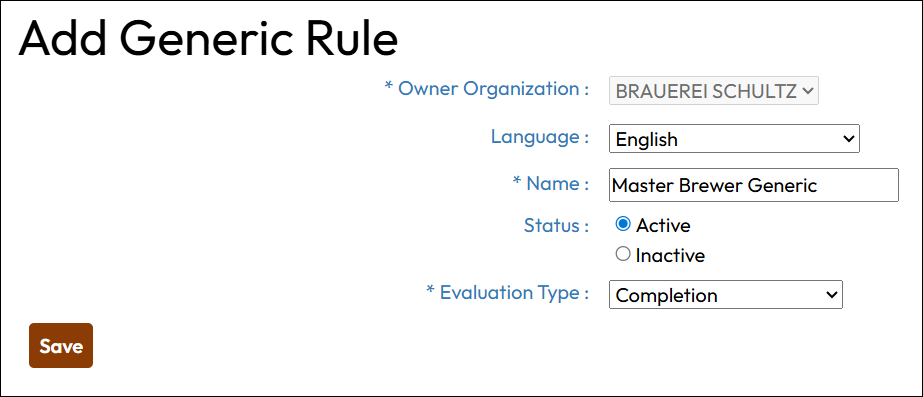
  2. Click +Generic Rule. On the “Add Generic Rule” page, enter information in each field as described below. Fields designated with an asterisk are required.
    a. Owner Organization: Display only. 
    b. Language: Provide translations for the Rule Name. Default “English” is required.
    c. Name: Provide a descriptive name or title for the rule.
    d. Status: Choose whether the rule is Active or Inactive for evaluation.
    e. Evaluation Type: Once you set the rule type, it cannot be changed. 
  3. Click Save
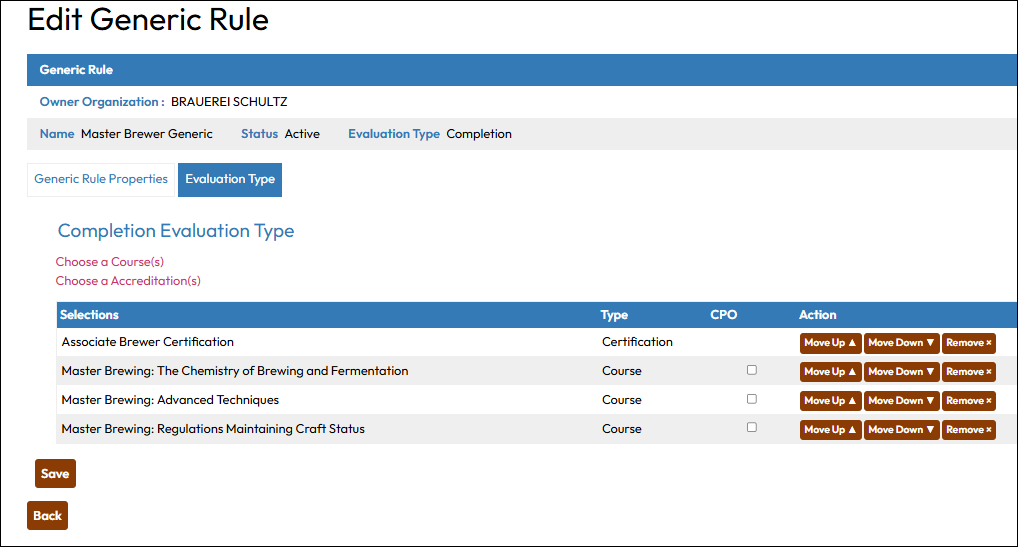
  1. The rule “Evaluation Type” page opens automatically, allowing you to define the exact requirement. The examples below shows entries for various evaluation types for which it is possible to set up without Latitude’s assistance.  
Completion Requirement
  • Choose a Course/Certification: Select list of courses and/or certifications needed to satisfy the rule. 
  • CYO (Current Year Only): When flagged true, the rule will only evaluate course or certification transcripts completed within the current calendar year, regardless of program eligibility. 
  • Move Up, Move Down, Remove: Use these buttons to manage list items and display order. 
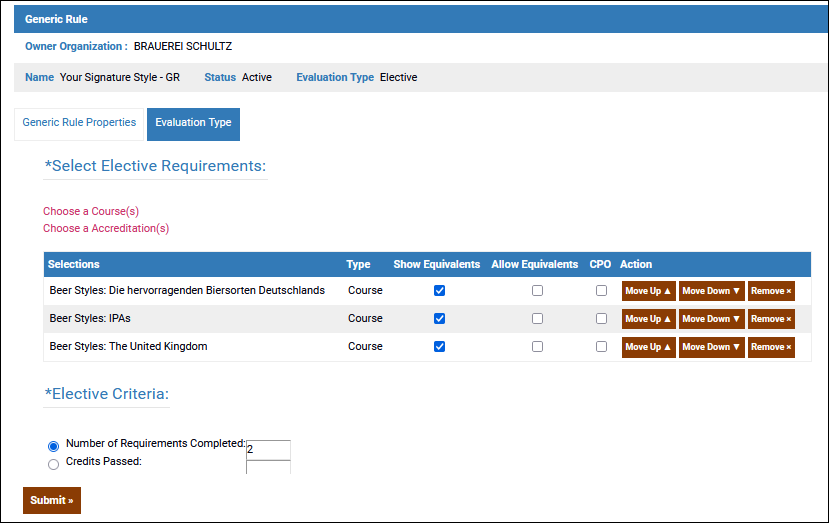
Elective Requirement
  • Choose a Course/Certification: Select the list of course and/or certification options. 
  • Allow Equivalents: When flagged true, the rule engine will accept equivalent course credit in substitution for listed course. 
  • CYO (Current Year Only): When flagged true, the rule will only evaluate course or certification transcripts completed within the current calendar year, regardless of program eligibility. 
  • Move Up, Move Down, Remove: Use these buttons to manage list items and display order. 
  • Elective Criteria: Define the number of required completions or credits learner must earn. 
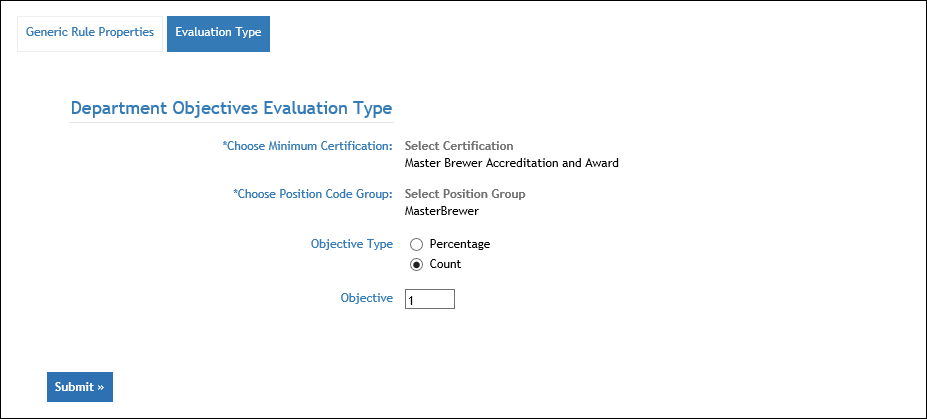
Department Objective
  • Choose Minimum Certification: Use the picker to select a Certification. 
  • Choose Position Code Group Select the group that must complete Certification above. 
  • Objective Type: Choose whether the objective will be based on Percentage or Count. 
  • Objective: Enter the value associated with Objective Type above. (For example, Percentage=80% or Count=4). 

Remember, to use the evaluation types for Individual Performance, Location Performance, and Top Percent, you will need to work with LatitudeLearning to establish the means of importing or inputting the necessary performance data to make these types of rules work.