Understanding Organizations
LatitudeLearning® provides a solid learning management platform that can be structured around your business and training needs. There are three key areas of data that form the foundation of the application: Organizations, Users, and Content. It is important to have a strong understanding of these elements to ensure your LMS is configured to best support your organizational training plans.
This page focuses the purpose and usage of organizations.
Overview
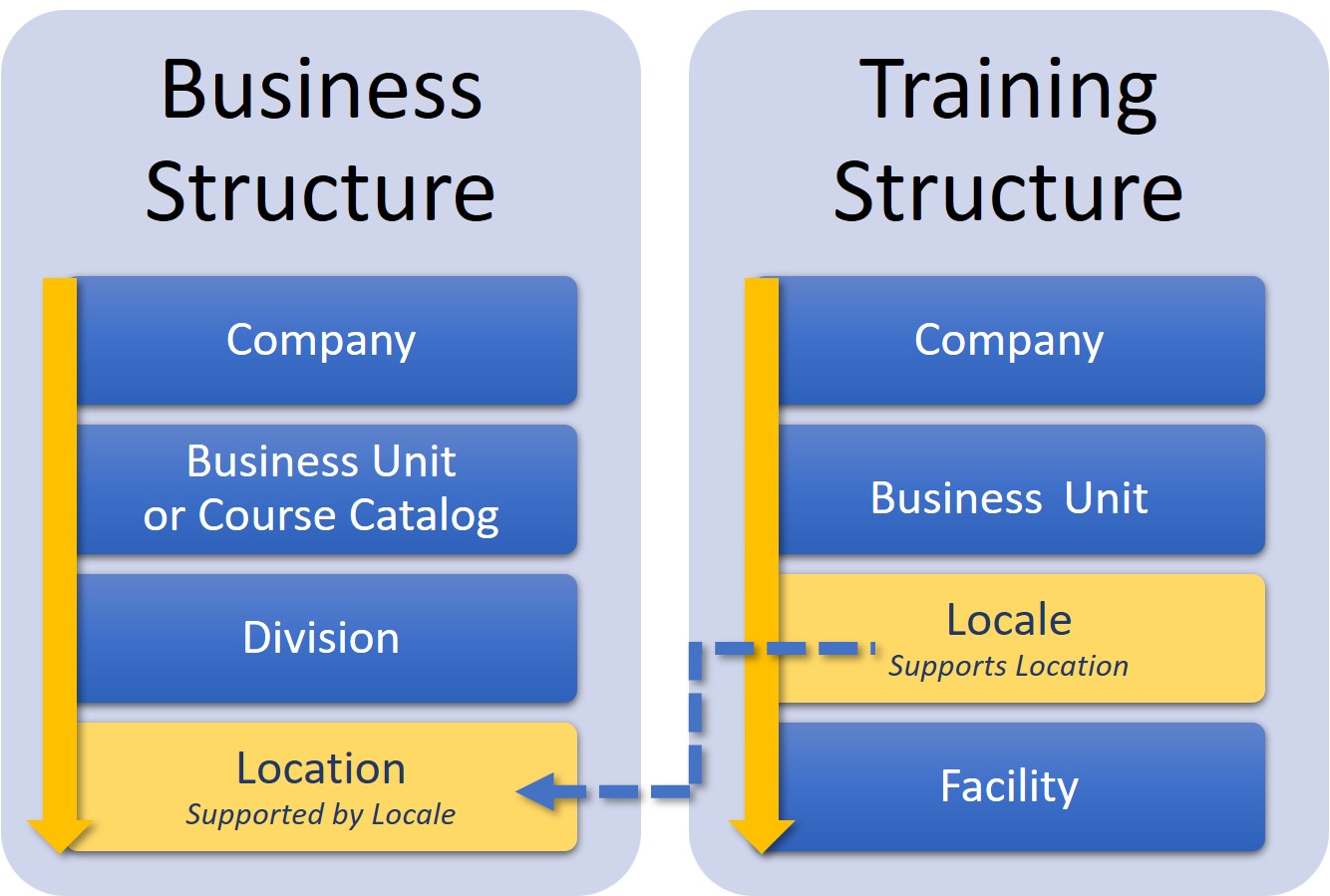
There are two structures that make up organizations:
- The Business Structure hierarchically organizes learners to facilitate managerial oversight, user rights and access, and the assignment of training.
This structure requires a company level and at least one each of the following hierarchical levels: Business Unit, Division, and Location.
- The Training Structure organizes training facilities for instructor-led courses, both physical and online. The primary training structure is a Locale, which connects training facilities to the business structure.
Business Organization Structures
The Business Hierarchy was designed with built-in benefits, including:
- Data security by allowing companies to scope or limit areas of access and data visibility within the organization or learner community (client, partner, internal)
- Flexibility for designing organization-specific needs and business rules (available course and resource catalogs, approval requirements, billing methods, featured courses), as well as flexible assignment of user profiles tied to each organization
Company
The company is the ‘owning organization’ that holds the portal-wide elements and settings, including the following:
- Roles – Control access rights to LMS functionality and reports.
- Positions – Control managerial reporting and subordinate visibility as part of the position hierarchy of superiors and subordinates, similar to an organization chart.
- User Groups – Ad-Hoc grouping of users across organizations, roles, and positions.
- User Experience – Includes the default styling of the LMS and optional customization by position group or by organization level. The User Experience includes options for branding to give the portal a familiar look and feel and even makes it possible to provide your own customers with customized branding for their organizations within your LMS.
There is only one company level organization allowed for each LMS portal and it should never be inactivated.
Business Units
The Business Unit (BU) is the level at which Resources and Courses are shared for all Divisions and Locations associated with that Business Unit. The parent organization for a BU is the Company. You can create custom course catalogs for each Business Unit by defining the following:
- Courses – Can be assigned to one or more Business Units. There are also course settings that can be set at the Business Unit level:
- Approval requirements
- Subscriptions
- Use of Interest Lists
- Majors – Allows grouping of courses in the course catalog to aid in course searches; must be associated with the same business unit as the course assigned to the major. Because of this need to match by business units with their associated courses, some clients prefer to use the multi-level topic feature for tagging courses for easier searching.
- Resources – Supplemental documents, videos, or URL links available to learners. They should be associated with the same business units as any courses to which they are attached
By sharing courses and resources with one or more business units – or not sharing with some, it is possible to restrict visibility of courses and resources to certain BUs. This is an important aspect when delineation of content is critical between learners in one area of the LMS and those in another.
Because of its importance in displaying the catalog and as the parent level of divisions and locations under it where users may be active, it is important not to inactivate a BU while active organizations and learners exist under it.
Divisions
A division serves as a reporting level for a grouping of locations beneath it. The parent organization for a Division is the Business Unit.
- Provides users assigned to division-level profiles with visibility and access to users and data scoped to specified Locations under the division without providing access to the entire organization.
- Whether there is one location under it or more, in the standard LMS a division is a necessary level to connect users at the location-level to courses and resources at the business unit-level.
Because of its importance in connecting BUs and locations where active learners are accessing the catalog, it is important not to deactivate a Division in which locations with active users are still present because it severs their connection to the catalog at the BU level.
Locations
This level serves as the base organizational unit for learners. It can represent an organization’s physical location or a virtual location. The parent business organization for a location is the Division and the parent training organization is the Locale. Locations allow you to:
- Establish the Student User Profile assignment and default login location
- Track User transcript activity and report on it
- Set up Featured Courses – Sets of courses being promoted, or featured, at specific Locations
- Set up Payment Methods for tuition – Direct payment, credit card, PayPal active at specific Locations
- Set up Subscriptions – Create and manage course subscriptions by Location
It is important not to inactivate a Location until all active users have been either transferred to other location or inactivated.
Training Organization Structures
The Training Structure supports these benefits:
- Management of your training organization separate from your corporate hierarchy
- Ability to determine where a learner is allowed to take instructor-led training
Locales
Locales are training regions, which generally relate to one or more Locations in the Business Structure. The parent training organization is the Business Unit. Locales allow you to:
- Manage multiple training regions as needed (e.g. East Coast vs. West Coast)
- Link one or more training facilities to a locale to help coordinate training schedules and classroom reservations
- Establish the “home” locale on a Facility. Additional locales can be added to the facility and any of the locales can be set to allow auto-enrollments in related offerings.
If your organization does not restrict access to classroom/virtual classroom training based on where learners are and they are free to attend anywhere, it is not necessary to create an extensive list of locales.
Facilities
Physical and virtual training facilities used for instructor-led courses. Features of facilities include:
- Options for both in-person and webinar-style facilities
- Rooms for managing classroom assignments and conflicts during offering scheduling
- Equipment for managing things like the facility’s computers, projectors, and other instructional aids
- Established Time Zones for Classroom Course Offerings
- Management of Instructors by the facilities in which they are available to teach