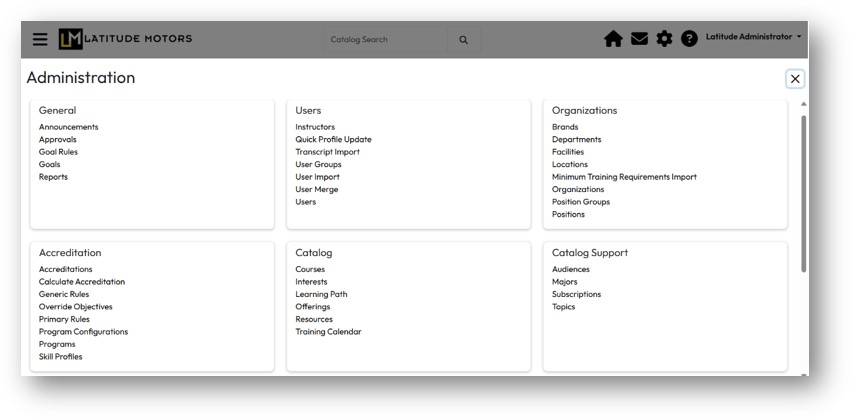
Since the October 26 LatitudeLearning release, portal administrators will notice a refreshed and more intuitive Administrator Navigation experience. The new layout, still accessed via the gear icon in the LMS header, emphasizes ease of use and organization, offering a cleaner, more logical structure that makes it faster to locate and manage key administrative functions. By grouping related features together, the redesigned navigation helps you move efficiently through your daily portal administration tasks with few extra clicks and confusion.
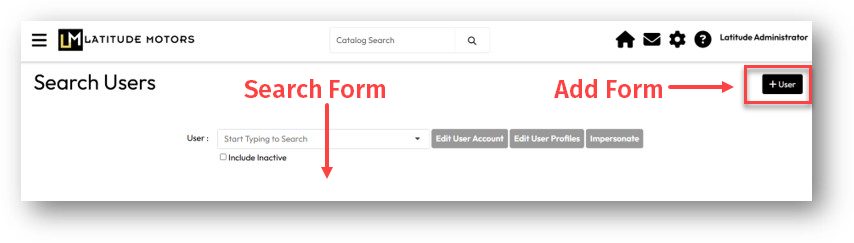
And example of this enhancement can be found in the transition of Add User and Search Users into a single Users page that contains a Search form and a button to access the Add User form – all from the same page!
By placing the option to add new objects (users, courses, offerings) directly in the upper right corner of the search page, it makes it easy to create new items while viewing your search results. This streamlined experience ensures administrators can manage their portals with clarity, efficiency, and confidence.
In the first iteration of this enhancement, the Favorites menu is not available. A phase 2 enhancement in an upcoming release will include a Favorites option that will work with the new Administrator experience.
In the example below, selecting Users under the User section now acts as both Search Users and Add Users – the search form is the default view and the +User button at the upper right takes you to Add User form.
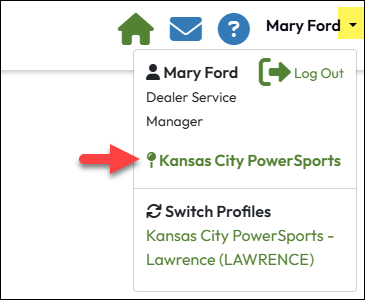
Others roles which had more limited access to options on the Administration menu will retain access to those options in the new layout. One exception to this is the My Location option available to Students and non-administrative users on the Classic navigation menu. This function has been replaced by a link to the logged-in users Primary location record in the drop-down menu associated with the user’s name on the right side of the LMS Header.