Have you ever wondered about building Accreditations in your LatitudeLearning LMS®, but were a little intimidated by the process? Even though basic accreditations are actually simple to build “the old-fashioned way” in our traditional Accreditation process, the newer Learning Path feature was missing from the elements available for inclusion as a requirement. To close that gap and offer a new method for building accreditations that is very intuitive and quick to enable, we sought a solution that focuses on Learning Path configuration rather than updates to the standard Accreditation process.
We’re pleased to introduce he ability to create Accreditations directly from the Learning Path administration page, based on the content of Static or Dynamic Course List Learning Paths. This solution went live after our enhancement post on June 7 for customers on our SaaS platform.
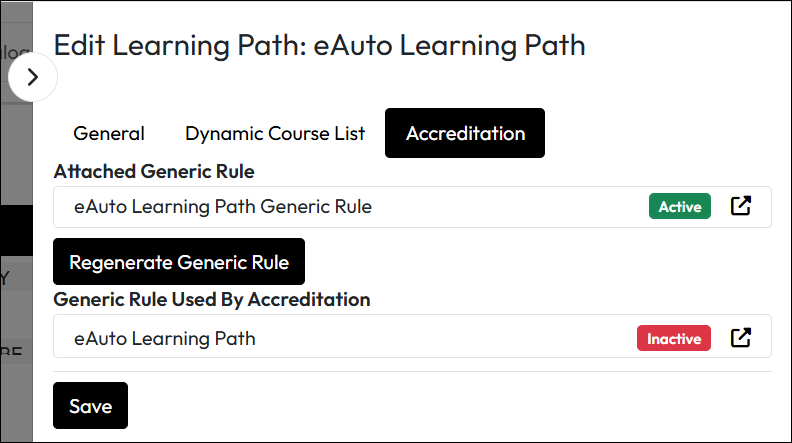
The image below shows how this would look on a Learning Path configuration page after generating an Accreditation.
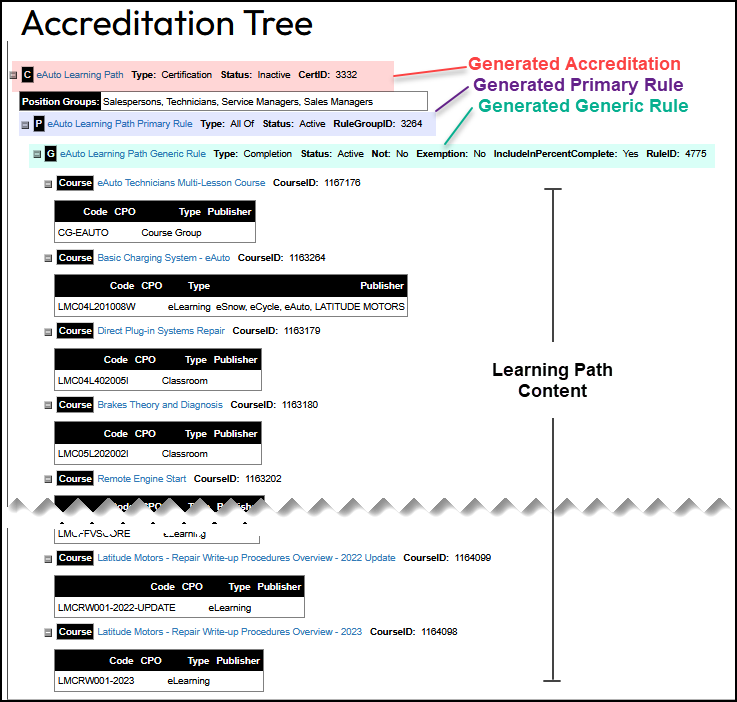
This Accreditation tree view shows that a learning path-generated Accreditation is still a full-fledged accreditation visible when searching for Accreditations. The structure below is unmodified and built completely from the Learning Path page.
These are some key points about this enhancement to Learning Path functionality:
To learn more about Learning Paths and the process for creating accreditations based on them, check out Create Learning Paths for Students on our Support website.