In LatitudeLearning®, an Accreditation, whether a Certification or a Curriculum, is a set of course completion rules and related performance objectives that students must complete in order to demonstrate their professional competency. Our powerful goal assignment and accreditation engines help administrators automate their training programs and track compliance along the way.
Multiple tools work in tandem to evaluate prerequisites, equivalencies, electives, mandatory course rules, and even performance data to certify people’s skills and drive employee performance. Because of this flexibility, it is important to understand your business or industry requirements prior to building a compliance program into the LMS.
Use this document to guide you through the process of building a Certification or Curriculum. Navigate to a specific section of this document using the Shortcut links, which are shown in the general order of precedence for creating and launching a compliance program.
Once you have created some of these data structures, you may be able to skip steps when adding new accreditations.
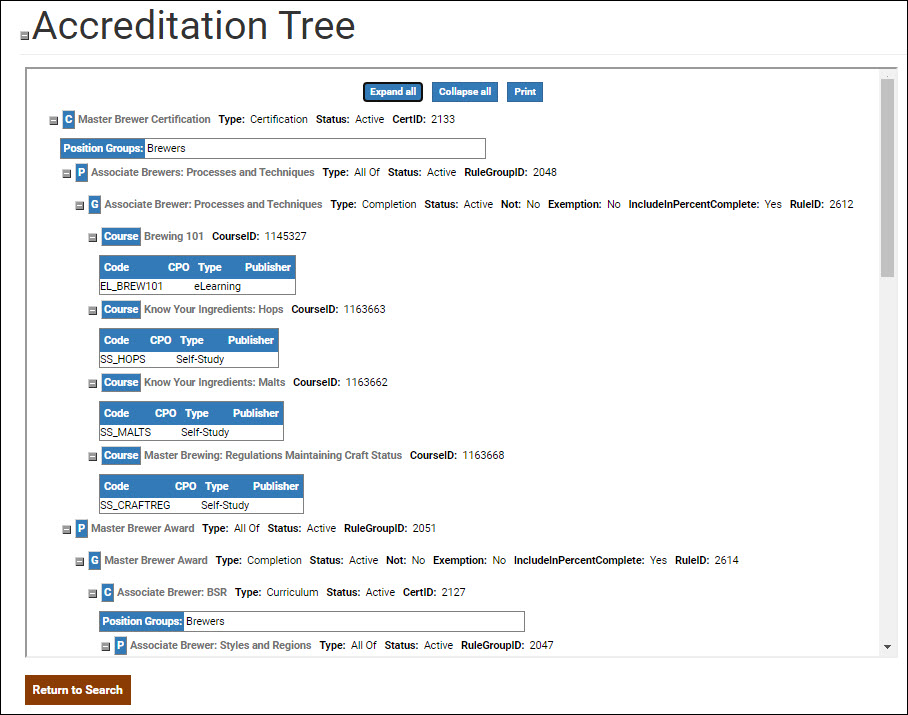
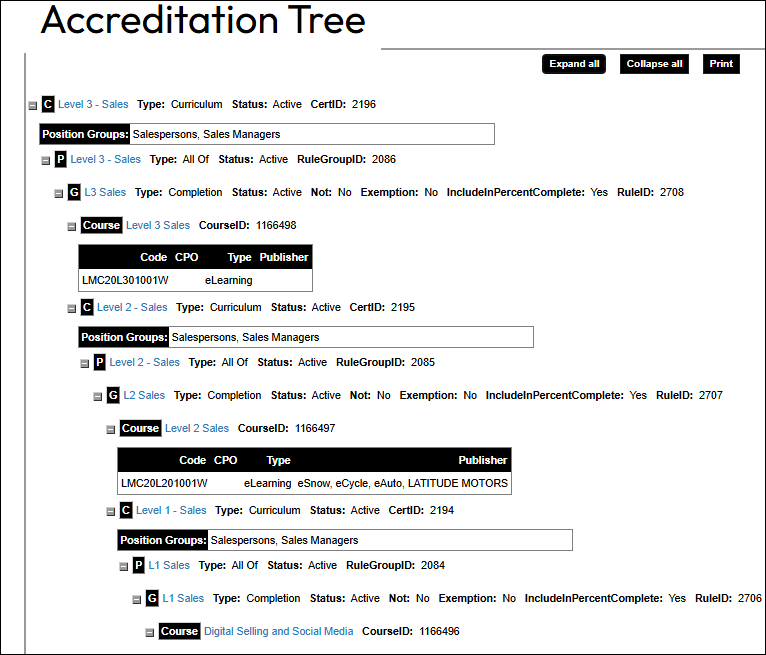
The View Tree option under Accreditations is a great way to visualize how all the elements of an accreditation come together, from courses and position groups to the generic, primary, and accreditation rules that build the learning requirements.
A program is the time-frame during which a learner may earn the accreditation associated with it. It is possible to have multiple programs active concurrently. Courses completed after the end date of the program will not count toward the accreditation.
Some examples are:
Learn how to create a program in the LMS: Set Up Programs
A Position Group is a collection of Position Codes, or job titles, that determine Accreditation eligibility. For instance, if your “Teacher” position and “Substitute Teacher” position had identical training requirements, you could include both in a single position group called “Teaching Staff” and assign them the same accreditation goals. Positions with unique requirements may need their own position group. Using the same example, if “Teacher” and “Substitute Teacher” have any differences in their certification requirements, you may want to set them up with 1:1 Position groups: Teacher Position = Teacher Position Group and Substitute Teacher Position = Substitute Teacher Position Group.
Each Position Code may only belong to one Position Group at a time.
To create and edit a Position Groups: Manage Position Groups
Generic Rules form your base-level accreditation requirements. Because generic rules are not tied to a program or a position group, you can structure them for reuse in any number of accreditations. Develop a compliance program that utilizes any combination of Evaluation Types:
Note: The following performance-based evaluation types require the ability to capture performance data for the selected metric. They were developed for a specific customer to meet a very particular requirement. If your organization is interested in using these evaluation types, please contact support@latitudelearning.com to learn more.
Learn how to create a generic rule in the LMS: Set Up Accreditation Generic Rules
Accreditations are built as a list of Primary Rules, which are simply a grouping of one or more Generic Rules. Just like their generic counterparts, Primary Rules can be structured for reuse in any number of certifications or curriculums. Create primary rules that evaluate compliance as either a “One of” or “All of” requirement; so that learners must complete either “one of” the generic rules in list or “all of” them to meet the primary training objective.
Learn how to create a Primary Rule in the LMS: Set Up Primary Rules
Accreditation functionality in LatitudeLearning is very robust, offering your organization great flexibility in designing training programs that develop and measure student competencies. Now that you have built all the rules around training requirements (Generic Rules), eligible participants (Position Groups), compliance standards (Program), it’s time to tie these elements together and launch your actual accreditation as a certification or a curriculum.
Learn how to create a Certification-style Accreditation: Set Up an Accreditation – Certification
Learn how to create a Curriculum-style Accreditation: Set Up an Accreditation – Curriculum
After your Accreditation is set up, you can assign it as a training goal to your program participants and configure scheduled reports to track compliance. Our powerful accreditation engine will handle the rest.
If ever you need to review the overall set-up or revise this accreditation, the View Tree feature provides a complete view to assist you. The Accreditation Tree provides a detailed breakdown of all rule types, status, and affected position groups. Expand and collapse rules as needed, click links to navigate to rules of interest, or click Print to save for your records.