- Administrators
- Instructors
- Managers
- Students
- LatitudeLearning Academy
- Release Notes
- Sign In
The Audience feature allows portal administrators to set up rules that define membership and then leverage that Audience as a group for enrollments, notifications, and other uses. This makes Audience membership dynamic. Once an Audience rule is established with specific criteria defining the membership, the LMS includes anyone who matches those criteria at the given time. Membership automatically fluctuates to include or exclude individuals depending on how they meet the rule’s criteria.
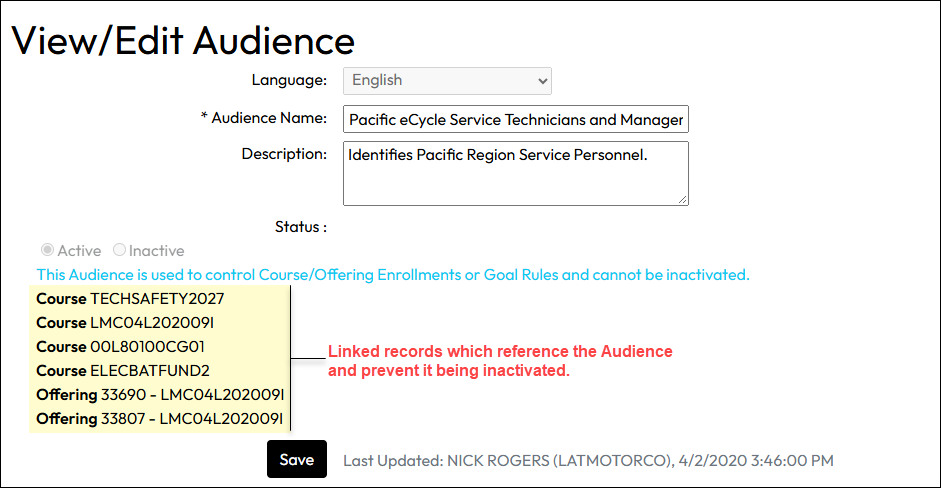
When editing or inactivating an Audience, the portal administrator will see a list of active objects that use the Audience, including Courses, Classroom Offerings, and Goal Rules, so that they can understand what they may be affecting by the modifications. These objects are linked to the original records to easily make any adjustments necessary. While items exist on this list, it is not possible to inactivate the Audience.

Note: A list of any courses, offerings, or goal rules tied to the Audience is displayed. While objects appear on this list, inactivation of the Audience is impossible. If inactivation is the purpose of the edit, the portal administrator will be required to remove references to the audience on those objects. To facilitate this effort, the listed objects are linked to their original record.